DOMjudge: Full chain
TL;DR: DOMjudge from git commit ee3dea3 up to git commit 2a244d9 allows for unauthenticated root-level code execution and container escape if user sign-up is enabled. This is done by chaining five vulnerabilities: an arbitrary file read, Symfony Edge Side Inclusion, command injection, privilege escalation and Docker escape.
DOMjudge is an automated system to run programming contests like the International Collegiate Programming Contest (ICPC). It’s completely open source, written using PHP Symfony and available on GitHub.
The goal of this project was to create an exploit which would allow an unauthenticated attacker to gain arbitrary code execution with the highest privileges DOMjudge had access to.
Table of contents
DOMjudge overview
Before we continue, a quick overview of how DOMjudge works on a high level.
DOMjudge consists of two components: one “domserver” and one or several “judgehosts”, these are each independent Docker images on the Docker registry.
The domserver is what most users see, it contains the public scoreboard, admin panel and submission interface. The domserver collects the submissions, distributes them to the judgehosts and displays the results.
The judgehosts periodically poll the domserver for new submissions. When a new submission is assigned to a judgehost it builds or compiles the program if needed, runs it against the predetermined test set and then reports the results back to the domserver.
Testing setup
The first part of this project was to create a test setup and do some background reading into setting up DOMjudge.
For the test setup, I found this blog post about deploying DOMjudge within Docker. I wanted the test instance to have DOMjudge configured per the developers’ recommendations, and using the provided DOMjudge Docker image seemed like a good way to ensure that.
When setting this up I noticed an interesting Docker configuration being used, which will be mentioned in the next section. This configuration provided a good end goal and allowed me to work backwards. Instead of asking “I have x vulnerability, what can I do with it?” I could go “I need x access, how do I achieve y?”. This helped focus the research while iteratively making the required goal “y” smaller. For example, first looking for code execution, then file read, then HTML injection.
The vulnerabilities
Docker escape
While setting up a test instance, I noticed that the judgehost image is required to run with additional privileges. This is done to allow the use of cgroups to limit the resources a test instance can use.
It, however, also allows a root process within the container to mount the host file system and interact with it.
For the exact details you can see here, but the takeaway is: “If we can run root code within the judgehost container, we can access the underlying host”
Sudoers privilege escalation
We could now try to get root-level code execution within a judgehost as a domserver user. However, this will likely require multiple exploits so let’s take smaller steps. Firstly, how do we get root-level code execution within judgehost?
Let’s start one step below this and assume we control the “domjudge” user, what can we (directly) run as root?
domjudge@judgedaemon-0:/$ sudo -l
Matching Defaults entries for domjudge on judgedaemon-0:
   env_reset, mail_badpass, secure_path=/usr/local/sbin\:/usr/local/bin\:/usr/sbin\:/usr/bin\:/sbin\:/bin

User domjudge may run the following commands on judgedaemon-0:
   (root) NOPASSWD: /opt/domjudge/judgehost/bin/runguard *
   (root) NOPASSWD: /bin/chown -R domjudge\: /opt/domjudge/judgehost/judgings/*
   (root) NOPASSWD: /bin/mount -n --bind /proc proc
   (root) NOPASSWD: /bin/umount /*/proc
   (root) NOPASSWD: /bin/mount --bind /chroot/domjudge/*
   (root) NOPASSWD: /bin/mount -o remount\,ro\,bind /opt/domjudge/judgehost/judgings/*
   (root) NOPASSWD: /bin/umount /opt/domjudge/judgehost/judgings/*
   (root) NOPASSWD: /bin/umount -f -vvv /opt/domjudge/judgehost/judgings/*
   (root) NOPASSWD: /bin/cp -pR /dev/random /dev/urandom /dev/null dev
   (root) NOPASSWD: /bin/chmod o-w dev/random dev/urandom
There are several interesting options listed here that could potentially be exploited. GTFOBins contains several known techniques that could, in combination with the wildcards, probably be used to achieve root.
However, there is a more straightforward way to achieve this. Let’s look at this first entry:
(root) NOPASSWD: /opt/domjudge/judgehost/bin/runguard *
This means that our current user may run a program named “runguard” stored at that location as root, with any arguments. Let’s take a quick look at the program location:
domjudge@judgedaemon-0:/$ ls -lah /opt/domjudge/judgehost/bin/runguard
-rwxr-xr-x 1 domjudge domjudge 108K Feb 26 12:59 /opt/domjudge/judgehost/bin/runguard
The program is owned by the user “domjudge” (us) and we hold r(ead),w(rite) and (e)x(ecute) permissions over it.
In summary:
- We may run the program “runguard” as root
- We can modify the program “runguard”
This allows the domjudge user to run any command as root, simply by adding malicious code to the runguard program and running it as root.
Command injection
Now, let’s try to find a way to get control of the domjudge user.
The core process, within a judgehost is “judgedeamon.main.php”, this process polls the domserver for new submissions, judges them and reports the results back. If we want to attack the judgehost server we have two attack surfaces:
1) The interaction between the domserver and a judgehost as judge tasks are fetched or reported.
2) The judge tasks themselves
The second one is the more attractive target because we already control part of the judge task, our code submission. This means that, provided that we can queue new judgings, we have a wide degree of freedom to exploit any possible bugs. Additionally, we would likely not have to modify the behavior of the domserver to exploit a potential bug. However, there are a few caveats with this attack surface:
- All judgeruns are run within a chroot
- All judgeruns run as a less privileged user instead of the domjudge user.
I spent a lot of time investigating the chroot, however, I could not find a way to achieve root from within the chroot or
otherwise escape it. There was some attack surface (most notably /proc was mounted within the chroot), but the less
privileged user made it very difficult to abuse.
There are some attack surfaces I didn’t look at, for example, the creation & cleanup of the chroot, runguard (written in c) and evict.c. More bugs may exist here, but given the mentioned restrictions option 1 was starting to look more and more appealing.
Looking through judgedeamon.main.php, there are several calls to system. Most of these were first escaped and
then concatenated like the following example:
system('rm -rf ' . dj_escapeshellarg($execdir) . ' ' . dj_escapeshellarg($execbuilddir));
However, there is one system call on line 1269 which is not escaped.
$workdir = judging_directory($workdirpath, $judgeTask);
// irrelevant code
$cp_cmd = "cp -PRl '$workdir'/compile/* '$programdir'";
system($cp_cmd, $retval);
In theory, this is fine, as programdir is not determined by any external variables, and workdir is derived from
the job id and submit id, which are both integers.
function judging_directory(string $workdirpath, array $judgeTask) : string
{
	return $workdirpath . '/'
    	. $judgeTask['submitid'] . '/'
    	. $judgeTask['jobid'];
}
However, there is no check within the judgehost to ensure these variables are in fact integers, which means the domserver may dispatch a job with the submit id
{
    // data
    "submitid":  "; echo 1 > /tmp/pwned.txt #"
    // data
}
to gain code execution on the judgehost.
Exposed database
This means that, in theory, controlling a submit id equals code execution. This led me to investigate how jobs are stored.
Jobs are created and queued in the database, the domserver adds jobs into a table and then adds them to a queue. This means control over the database means code execution, again, in theory.
At this point, I discovered that my Docker setup, which was copied from a blog post, had hard-coded credentials for the SQL server. In addition to this, it exposed the SQL port on all hosts. Oeps 😅
I didn’t end up finding a way to gain control over the database without code execution, when I went back to this I also discovered that this vector would not have worked due to two reasons:
- The column type for submit id is
int, though, with enough access to the database, this can be modified. - The ORM expects the submit id to be of type
intand will give it a null value if it is not a valid integer.
That said, having control over the database, and being able to create admin users still would result in code execution for reasons that will be mentioned later.
RCE: PHP Symfony Edge Side Inclusion
With no luck trying to get control of the database, I went back to the original line of investigation: getting code execution on the domserver.
At the start of the project, I had done some background reading on Symfony, mostly from a security perspective. One great source for this was Carlos’ HackTricks page on PHP Symfony. It contains an in-depth explanation of exploiting Edge-Side inclusion, which allows code to be included at runtime.
This feature is quite dangerous and has been heavily exploited in the past. Because of this, more recent versions of Symfony disable this feature by default. Fortunately for this project, the feature was enabled within DOMjudge.
ESI requests must be signed using the Symfony secret. In theory, this prevents an attacker from using this feature to run unauthorized code, however, if an attacker can leak or guess the secret this security boundary drops.
In this case, the secret is securely generated and stored in three locations:
- phpinfo, which is an admin-only web page
- symfony.secret, a file within the domserver installation
- /proc/self/environ, as an environment variable
This meant that, if we could read an arbitrary file, leak environment variables or get an admin account we would have code execution.
Flag API (almost) file read
With this in mind, I started going through every unauthenticated endpoint. One API endpoint, in particular, stood out,
the function for /country-flags/{countryCode}/{size}.
public function countryFlagAction(Request $request, string $countryCode, string $size): Response
	{
    	// This API action exists for two reasons
    	// - Relative URLs are relative to the API root according to the CCS spec. This
    	//   means that we need to have an API endpoint for files.
    	// - This makes it that we can not return a flag if flags are disabled.

    	if (!$this->config->get('show_flags')) {
        	throw new NotFoundHttpException('country flags disabled');
    	}

    	$alpha3code = strtoupper($countryCode);
    	if (!Countries::alpha3CodeExists($alpha3code)) {
        	throw new NotFoundHttpException("country $alpha3code does not exist");
    	}
    	$alpha2code = strtolower(Countries::getAlpha2Code($alpha3code));
    	$flagFile = sprintf('%s/public/flags/%s/%s.svg', $this->dj->getDOMjudgeWebappDir(), $size, $alpha2code);

    	if (!file_exists($flagFile)) {
        	throw new NotFoundHttpException("country flag for $alpha3code of size $size not found");
    	}

    	return AbstractRestController::sendBinaryFileResponse($request, $flagFile);
	}
The size parameter could be used to achieve directory traversal. However, after spending a lot of time looking at this it didn’t seem feasible for two reasons:
- Symfony doesn’t accept
/as a URL parameter (not even url encoded) - The path must end in
.svgand null bytes are no longer allowed in modern PHP versions
Scoreboard file read
At this point, I had spent around one to two weeks on the project. While not all components mentioned here were fully worked out, they had been at least identified.
I then spent the next 1.5 months working off and on, meticulously going through every unauthenticated web endpoint, learning new tricks about PHP Symfony with little progress.
It is important to note that I had a slight discrepancy between my test setup (latest official release) and the code I was reviewing (latest git commit). Because of this, I was purposefully skipping over functionality that had been added after the most recent release.
For example, I would use the Symfony console to manually parse every available route
./console debug:router
and then pull up the source code for that route. My hope was that this way I would exhaustively review every route and reduce the chance that I would gloss over one in the source code.
At one point, I did investigate one route that hadn’t been released yet.
 /**
 	* @Route("/scoreboard-data.zip", name="public_scoreboard_data_zip")
 	*/
	public function scoreboardDataZipAction(RequestStack $requestStack, string $projectDir, Request $request): Response
	{
    	$contest = $this->getContestFromRequest($request) ?? $this->dj->getCurrentContest(-1);
    	$data	= $this->scoreboardService->getScoreboardTwigData(
            	$request, null, '', false, true, true, $contest
        	) + ['hide_menu' => true, 'current_contest' => $contest];

    	$request = $requestStack->pop();
    	// Use reflection to change the basepath property of the request, so we can detect
    	// all requested and assets
    	$requestReflection = new ReflectionClass($request);
    	$basePathProperty  = $requestReflection->getProperty('basePath');
    	$basePathProperty->setAccessible(true);
    	$basePathProperty->setValue($request, '/CHANGE_ME');
    	$requestStack->push($request);

    	$contestPage = $this->renderView('public/scoreboard.html.twig', $data);

    	// Now get all assets that are used
    	$assetRegex = '|/CHANGE_ME/([/a-z0-9_\-\.]*)(\??[/a-z0-9_\-\.=]*)|i';
    	preg_match_all($assetRegex, $contestPage, $assetMatches);
    	$contestPage = preg_replace($assetRegex, '$1$2', $contestPage);

    	$zip = new ZipArchive();
    	if (!($tempFilename = tempnam($this->dj->getDOMjudgeTmpDir(), "contest-"))) {
        	throw new ServiceUnavailableHttpException(null, 'Could not create temporary file.');
    	}

    	$res = $zip->open($tempFilename, ZipArchive::OVERWRITE);
    	if ($res !== true) {
        	throw new ServiceUnavailableHttpException(null, 'Could not create temporary zip file.');
    	}
    	$zip->addFromString('index.html', $contestPage);

    	$publicPath = realpath(sprintf('%s/public/', $projectDir));
    	foreach ($assetMatches[1] as $file) {
        	$zip->addFile($publicPath . '/' . $file, $file);
    	}
		// Snip, includes webfonts, sets HTTP headers & returns
	}
This function exports the scoreboard and any includes in a zip file. It does this as follows:
1) Set the base path as “CHANGE_ME”.
2) Render file.
3) Search for all instances of this string with regex.
4) Include all files these instances point to.
For example, say an HTML file contains the following snippet:
<img src="/logo.png">
This will render too
<img src="/CHANGE_ME/logo.png"
The regex will then identify the path as
/logo.png
And include
/public/logo.png
to the resulting zip.
Crucially for this exploit, no check is done to see if CHANGE_ME is present before rendering. This means that, if an
attacker can inject text (any text) into the HTML page after rendering, they can include any file.
I looked for several ways to do this, mostly investigating the filter values. Ultimately I decided to bend the goal slightly, I had originally planned to exploit a system that had all default configurations. However, to make this final step work I made a slight modification to the default configuration to enable user sign-up.
This means an attacker could register a new contestant team with the team name /CHANGE_ME/../../etc/symfony_app.secret
to leak the Symfony secret.
The exploit
While chaining all the mentioned vulnerabilities together in a single exploit I ran into a few issues. Both of them could be overcome or worked around, but I’m including them for completeness’s sake, and potentially inspiring future research.
Firstly, it turns out that the edge-side inclusion requires authentication. I’m not entirely sure why this is, my best guess is that the security settings by default require authentication for all pages, with pages having to be explicitly marked as public. There is likely a way around this however, considering I was already using a user account to register a team name, I decided to reuse the created account to run the ESI payload as an authenticated payload.
Secondly, when attempting to attack the judgehost I discovered that the PHP files were owned by root, instead of the user running the domserver. While this might vary depending on the installation, I wanted to stick to the ‘recommended’ setup. Accounting for this means the exploit would work in a wider variety of configurations.
To get around this, I noticed an interesting mechanic of Symfony. To perform route matching and allow for optimization
Symfony builds a cache, in this case in /opt/domjudge/domserver/webapp/var/cache/prod/*/*, which points to the
relevant files.
This is used to, for example, have URL parameters like this:
@Route("/change-contest/{contestId<-?\d+>}", name="public_change_contest")
We can copy the controller file and then update the cache to point to that, for example through a sed command.
sed -i "s/\\\\dirname(__DIR__, 4).'\/src\/Controller\/API\/JudgehostController.php'/'\/tmp\/JudgehostController.php'/g" /opt/domjudge/domserver/webapp/var/cache/prod/*/*
We can then modify this copy of the controller to introduce our intended functionality: code execution.
One other component that had to be updated was url_matching_routes.php. This is the file used to determine what
controller is used for a given URL in the example route above. The get_file URL takes the submission ID as an
integer and returns the file. Crucially, if the submission ID is not an integer it won’t be caught by the regex
and the domserver will return a 404. This 404 causes judgedeamon to return before the vulnerable call to system,
we can fix this by simply changing the regex in url_matching_routes.php to catch all characters.
sed -i "s/|get_files\/(\[\^\/\]++)\/(\\\\\\\\d+)/|get_files\/(\[\^\/\]++)\/(\[\^\/\]++)/g" /opt/domjudge/domserver/webapp/var/cache/prod/url_matching_routes.php
On a high level, the final exploit does the following:
The exploit registers a user with the team name “/CHANGE_ME/../../etc/symfony_app.secret”, then it exports the scoreboard as a zip file and extracts the SSymfony secret. The exploit then logs in to the created account and uses the extracted symfony secret to achieve code execution. At this point the domserver is compromised, we can modify the behavior of the web application and access the database. The exploit uses this access to modify the behavior of the domserver, creating a malicious copy of the judgehost controller and updating the Symfony cache to use it instead of the legitimate one.
The injection point being exploited on the judgehost has a size limit. Because of this the exploit first generates an
executable that escapes the judgehost container. This executable is uploaded in several steps to the domserver and put
within the /static/ folder, this allows the actual exploitation of the judgehost to only do two things:
- fetch and run the executable stored on the domserver
- sleep for a while to prevent the judgehost from reporting any errors and exiting before the exploit can run.
The executable has two stages, the root stage and the escape stage. The escape implements the docker escape, mounting
the host’s root partition and writing a proof message to /tmp/domjudge_docker_escaped.exploit on the host. The root
stage executes this escape as root by backing up runguard, overwriting it with the escape phase, running it as root
and then cleaning up.
Lessons learned
Looking back there are three main things I would do differently if I were to approach this project again.
Firstly, I would do more background reading on the framework itself. Something as simple as building a hello world app would have helped me understand the concept of controllers and security as well as introduce some shortcuts early on like the Symfony console.
Secondly, note keeping. When I first started this project I was sitting in the back of a car, lazily browsing code and my note-keeping followed roughly the same style. At the end of the project my note-keeping tree looked like this:
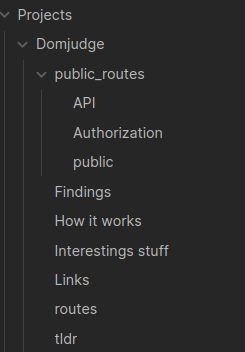
While it’s not terrible, it is certainly not as organized as it can be. A lot of things did not get taken into notes like links I read on my phone, thoughts I had when not working on the project and websites I didn’t bother to write down. All of these might have come in handy somewhere down the line.
Finally, I would have improved my debug setup. Because I was using Docker I could quickly tear down and rebuild the debug setup, however, I didn’t have an easy way to make modifications, do quick prototyping or attach a debugger. This cost me a lot of time when coding a proof of concept, I had to automate building and configuring a completely new Docker setup from source instead of the released Docker images.
Conclusion
Originally, I had envisioned using this project in a CTF. To create a challenge for participants to find exploits in, however, the platform I was developing the challenge for did not retire challenges.
This put me in a bit of a conundrum, once a player found a chain of exploits it would become significantly easier for new players to check the changes made to find old vulnerabilities. To compensate for this the CTF could constantly update DOMjudge, however, this would result in a significant difficulty spike after each player solved it.
While deliberating on this, I learned that the maintainers were planning to release a new version soon. This led me to decide to report my findings.
I’d like to thank the DOMjudge maintainers for getting back to me incredibly fast (5 minutes on a Sunday evening) and fixing all issues within 2 days! This does not seem to be limited to security issues, the DOMjudge slack is also filled with very fast responses from the maintainers. It’s very cool to see how passionate they are about this project.
That concludes this blog post. I hope you enjoyed it. If you have any questions or spot any mistakes feel free to hit me up on Twitter.